Blog
AI App Starter: A Custom Step-by-Step Process for Apps With Claude Code
By Tech Nomad · · 5 min read
I've built apps with Next.js, Supabase and Vercel together with AI several times, and it usually got messy. The biggest problem was structure. Every new chat session felt different. So did every planning phase, and every new phase of development. It wasted time, the workflow was unpredictable, and the project's state and documentation ended up a mess.
A good start is half the work. So I made the AI App Starter: the same process every time, for every session and every phase, from the first idea to launch. You start it with one line. Open Claude Code in an empty folder and paste this:
Set up this folder with the AI App Starter: clone https://github.com/TechNomadCode/AI-Product-Development-Toolkit with git clone --depth 1 into a temporary folder, then follow starters/nextjs-supabase-vercel/SETUP.md from it.
You can also add it as a skill: install the toolkit's skills once, then run /nextjs-supabase-vercel in Claude Code or $nextjs-supabase-vercel in Codex.
The agent copies the starter into your folder. It holds no app code, only instructions and rules: what to do at each stage of building a Next.js, Supabase and Vercel app, what to ask you and when, and what it may never do. From then on, the agent leads and you answer.
You need Node.js, Git and Docker. The starter is free and made for Claude Code; Codex support is in beta and not tested yet.
It starts with a conversation
First, the agent tells you where you stand. It works only on your computer, with a local database and stand-ins for payment and email, and it never uses the keys to your hosting or payment accounts, not even test keys. Those steps are yours, and it prepares them for you.
Then it asks whether you already have a plan: a PRD, a scope, a few notes. If you do, it asks only about the gaps. If you don't, it interviews you with the planning prompts from the same toolkit (I wrote about the first one in How I Turn Ideas Into Products With AI Prompts), one to three questions at a time, and writes nothing until you agree.
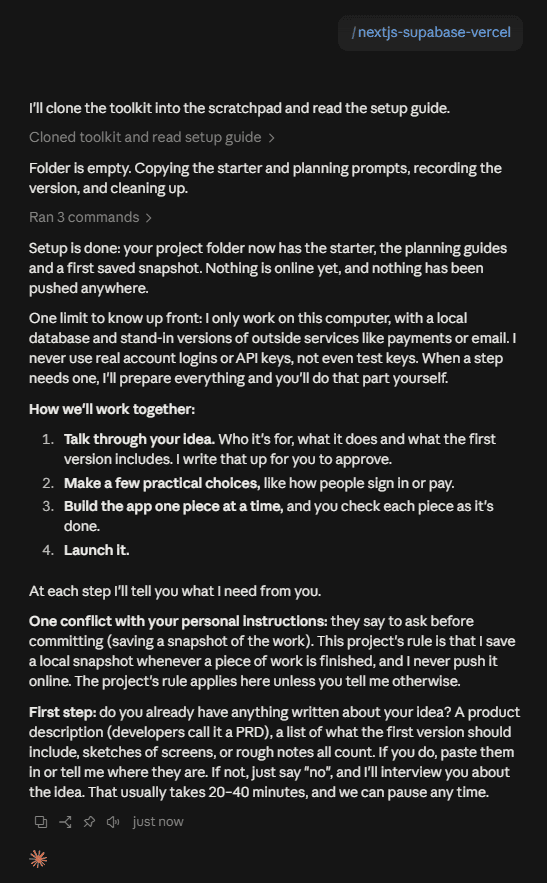
/nextjs-supabase-vercel skill.Next come the practical choices: who uses the app, what it stores, which languages, and which services handle payments or email. Each question comes with a suggested answer, so a plain “yes” is often enough. Your domain, tax or legal pages wait until they're due.
The first real feature
Then the building starts, with the smallest real feature that stores something and shows it. In the test run, a small web shop, that was browsing the catalogue. The agent proposes it and waits for your OK.
It builds that feature from the database to the screen, with tests in four layers and automatic checks on GitHub. A guard refuses to run anything against a database that isn't local or a service that isn't a stand-in. And the database starts locked, with row-level security on every table.
It also prepares the way online. Staging, a test copy of your app, updates by itself when you merge on GitHub. Production, your live app, changes only when you start it, and in both the database is updated before the new code runs. The agent never runs these steps itself: pushing and deploying are blocked, and there are no keys on your computer.
So this stage ends with a short list for you: create your GitHub, Vercel and Supabase accounts, follow the setup steps in your app's new README, push and merge. Staging then gets the database changes first, and the code after.
One piece at a time
From here, every session works the same way. You ask “what's next?”, and the agent tells you where things stand without changing anything. You say “continue”, or “do X instead”.
It builds one piece of the app per session. Its tests follow the requirements and are never weakened to get a pass, and it checks the current official docs before it uses a library or service. When the piece is done, it saves, tells you what to review and push, and suggests a fresh session. The plan always says where you are and what's next, and every session starts by reading it. Decisions and known problems each have one file too.
New ideas fit in along the way. Ask for a feature halfway through, and it goes into the plan with a question: now, or later?
Work on sign-in, permissions, payments or existing data gets a second look. The agent gives you one line to paste into a second agent, such as Codex, or into a fresh session, which reviews the work without changing anything. After one round of fixes and one more check, anything left is your call.
And when a piece depends on a real service like payments, the agent says its tests used a stand-in, and tells you how to try the real thing on staging with the provider's test keys.
Launch
The last stage takes one part per session: production, monitoring, security, search engines, privacy and legal pages, a final readiness check, and the switch to your domain. The questions it saved come back now. It won't decide law or tax for you; it shows you the options with official sources. You do the steps on the hosting sites, and it checks each one.
What's tested, and what isn't
- Tested: Claude Code desktop, from setup through planning, decisions, the first feature, and the first pieces of a web shop: a catalogue, product photos and a cart. The automatic checks passed on GitHub on the first push.
- Not tested yet: Codex, the hosted staging and production pipeline, and the launch stage.
I'll update this post as those get tested.
Where to get it
The AI App Starter is part of the AI Product Development Toolkit on GitHub, free under the MIT license. Found a problem? Open an issue.
TechNomadCode / AI-Product-Development-Toolkit
Plan, build and launch products with AI: guided planning prompts, an AI App Starter for Next.js, Supabase and Vercel, and agent configurations.
– stars– forks
View on GitHub